
eduroam is secure WiFi for Clarkson Campus Community
WiFi at Clarkson University:
- eduroam is faster, safer WiFi for Clarkson Students / Faculty / Staff on the Potsdam and Capital Region campuses.
- All other campus visitors use ClarksonGuest.

For Students, Faculty and Staff to Connect to eduroam WiFi:
Set-up ANYTIME before or after you arrive on campus. Use your laptop, smart phone or other wireless device you wish to connect to eduroam WiFi.
To Set Up:
Download the eduroam Configuration Assistant Tool (CAT) or get geteduroam app, launch the installer and complete the prompts. When prompted for username, you must provide Clarkson email (username@clarkson.edu) and password when prompted for username. Click below to choose your Operating System to install the latest tools:
Guests use public WiFi with ClarksonGuest
The ClarksonGuest network is available with no authentication for general and guest network access. However performance on this network will be limited, and since it is open, it is NOT considered secure. Only use this network to connect to eduroam CAT, or if your device cannot use eduroam.
Guest and General Access
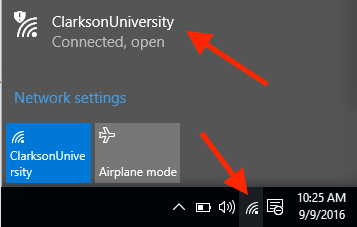
Turn on Wi-Fi and connect to the network (SSID) ClarksonUniversity.

Seek Further Assistance
For additional assistance please contact, Clarkson OIT Help Desk;
Online: Get Help
Email: helpdesk@clarkson.edu
Call: 315-268-HELP (x4357)