
Student FAQs
Below is a collection of questions that the TLC and Helpdesk have frequently received.

Moodle Moodle 4 FAQs
When should I open my Moodle course to students?
Does Moodle have an attendance tool for F2F classes?
Echo360
When should I set up my Virtual Class and Recordings link?
How do I add content from my Echo library to my course in Echo?
How do my students submit their video assignments to Echo?
Zoom
How do I set up a Zoom meeting?
Can my students share their screen during Zoom meetings?
LTI questions (?)
How can I integrate publisher content into my Moodle course?
Groups
How do I set up groups in Moodle
Announcements
Do announcements get sent to students when the course is still set to Hide?
I deleted the Announcements forum in my course, how can I get it back?
Grades
How do I enter midterm grades?
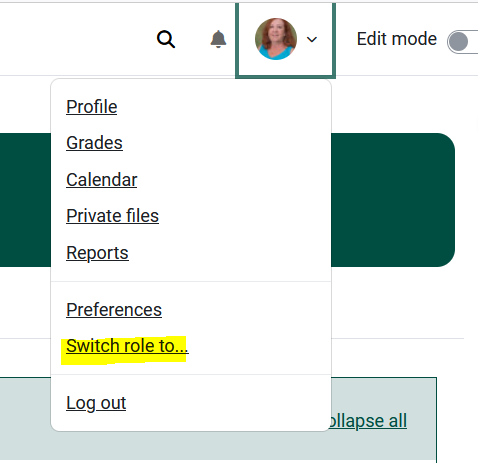
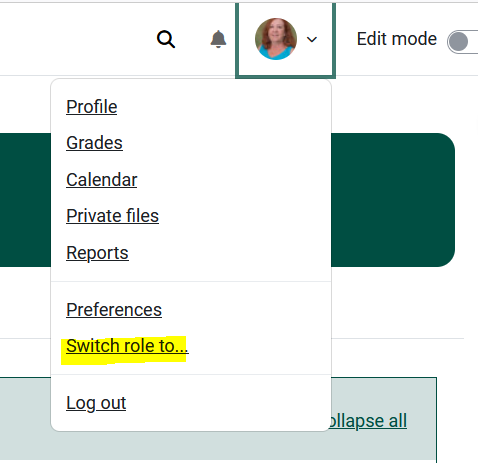
How do I switch my role to student so that I can see the course as they see it?
- Click the profile icon in the top right corner of Moodle 4.
- Select Switch role to... student .
Where can I access items previously in the Administration block?
Settings, reports, users, etc. previously found in the Administration block to the left side of your course in Moodle 3 can be navigated to through various methods:
- Click the Course Management (gear) icon in the top right corner of your course.

- Click the Course Management button on the left side of your course.
- Turn on editing and the traditional Administration block displays on the right side of your course.
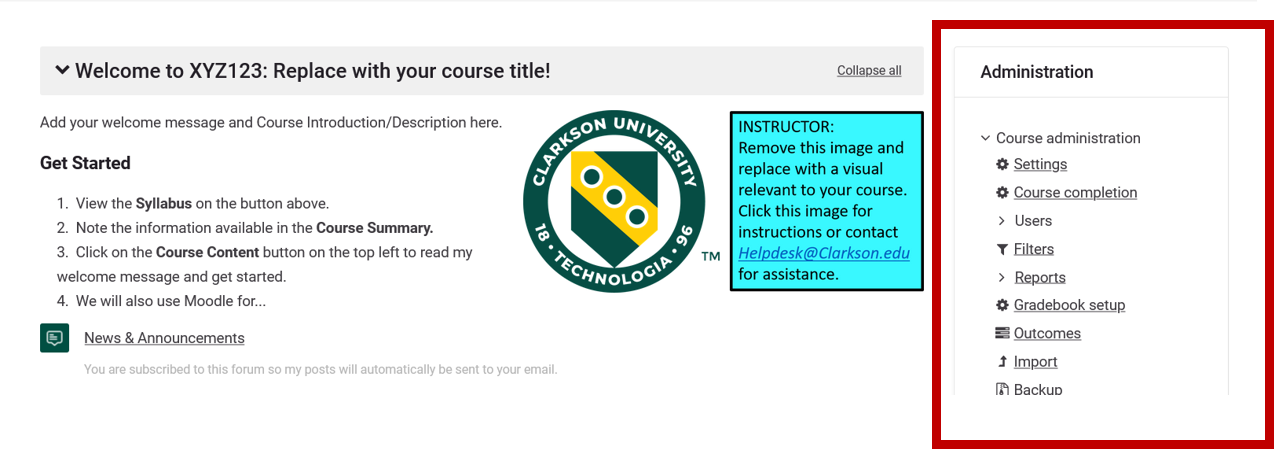
- Click the Course Management (gear) icon in the top right corner of your course.


What happened to QuickMail?
Quickmail was no longer working correctly. Please use the alternatives suggested in the Communicating with your Students...article.
What do I do if some students tell me that they could not access the course?
Send students the Moodle Quick Resources for Students via the course News & Announcements forum and they will get the instructions in their email.
How do I open my course to students?
Set the course to Show instead of Hide in the Edit Course Settings area - see Make Course Visible to Students.