
Clarkson Best Practices for Using Moodle
Faculty and staff can expect that our students are experienced learning management system users and will most likely look to how the Moodle LMS is used in your class. Please keep your course Moodle page looking professional by following these three simple best practices each semester.

Note there is now a syllabus button at the top of the course, please follow directions to replace your syllabus each semester.
(You can also add any Course Info and a course image on this page).
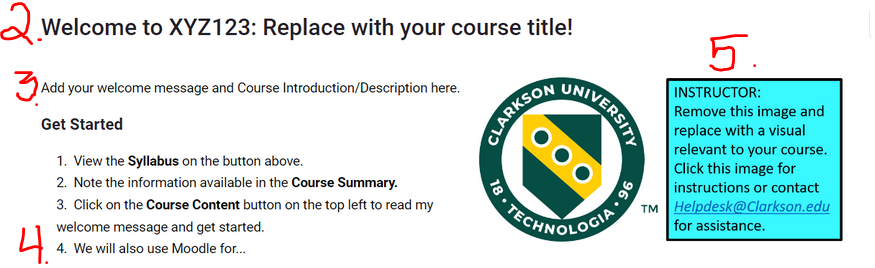
Then, as shown below, enter a brief description and explanation of how you will use Moodle (or not use) in a welcoming paragraph.
C
Add an image by following the directions in the template. If you added a course image in Step 1 above, you may choose to use
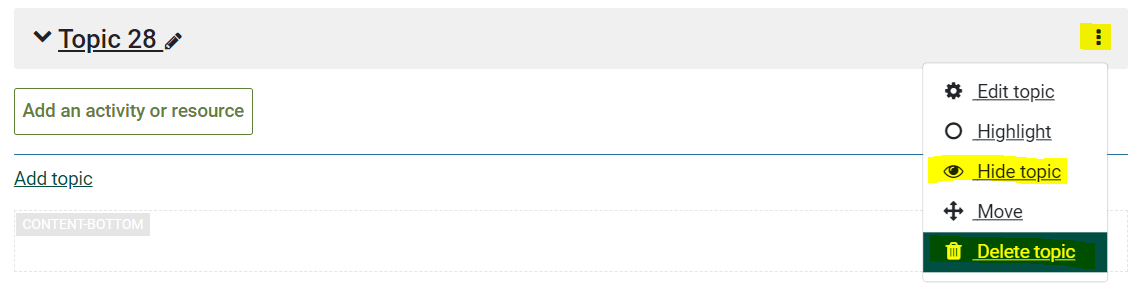
2. Delete or Hide any sections you do not use. (With editing turned on, click the ellipse to the right of the section:
3. Although not yet mandatory, we encourage you to use the Moodle Ggradebookradebook.
If you need any help designing or setting up anything in Moodle, please reach out by sending an email to HelpDesk@clarkson.edu.
See also Moodle 4 & More: Where to Go for Self-Help