
Committee Tasks
1. Review case contents

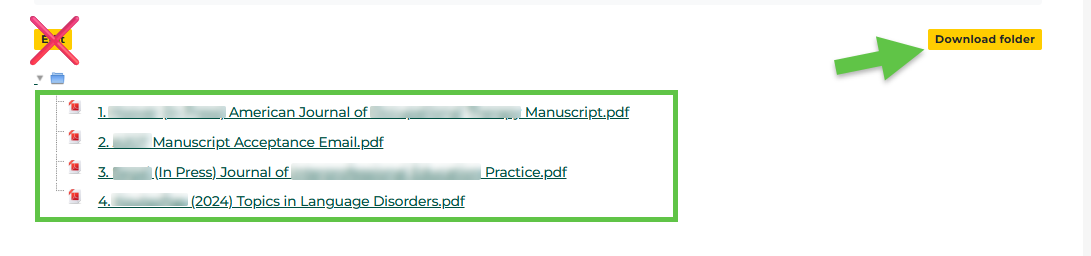
Enter each folder in each section to view contents of the folder.

Click on the file name to view each file orOR click Download folder to download and view the contents of each folder. Do not edit.
2. Write evaluation and recommendation letter based on the contents of the tenure file and evaluative standards described in OM 5.3.
ThisThe mustUniversity beTenure accompaniedCommittee bywill evaluate the candidate's tenure file to ensure that it contains adequate documentation to reflect properly the candidate's performance as it pertains to the granting of tenure. When satisfied as to the file's adequacy, the Tenure Committee will write a statementletter that evaluates the candidate's tenure file and presents a recommendation regarding tenure flow in the school,candidate's indicating how the award or denial of tenure would affect teaching and research in the school. This statement must also indicate the number of tenurable rank faculty in the School, the number currently tenured, and a projection for the next three years taking into account anticipated departures, faculty scheduled to be consideredsuitability for tenure review,(in andterms changesof the standard articulated in the5.3 numberabove). of tenurable positions.Both the Dean's letter and the tenure flow will be added to the file.
3. Upload letter
In Executive Reviewers section:
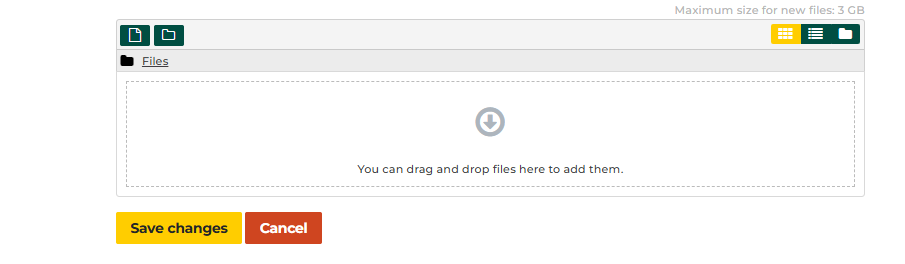
a) Double click to open DeanTenure or Promotion Committee uploads their review here folder.

b) Click Edit.

c) Drag and drop files and Save Changes.
When complete, Committee review.