
Click Course Materials Tool to Course - Clarkson Bound Program
Summary
Courses that are using digital courseware materials as part of the Clarkson Bound program (announcement here), will need to includeunhide aand click the Course Materials link in MoodleMoodle. soThis thatallows students canto access their materials.
Look for the Course Materials link in the top section of your course in Moodle. Unhide and click on it to activate the link.
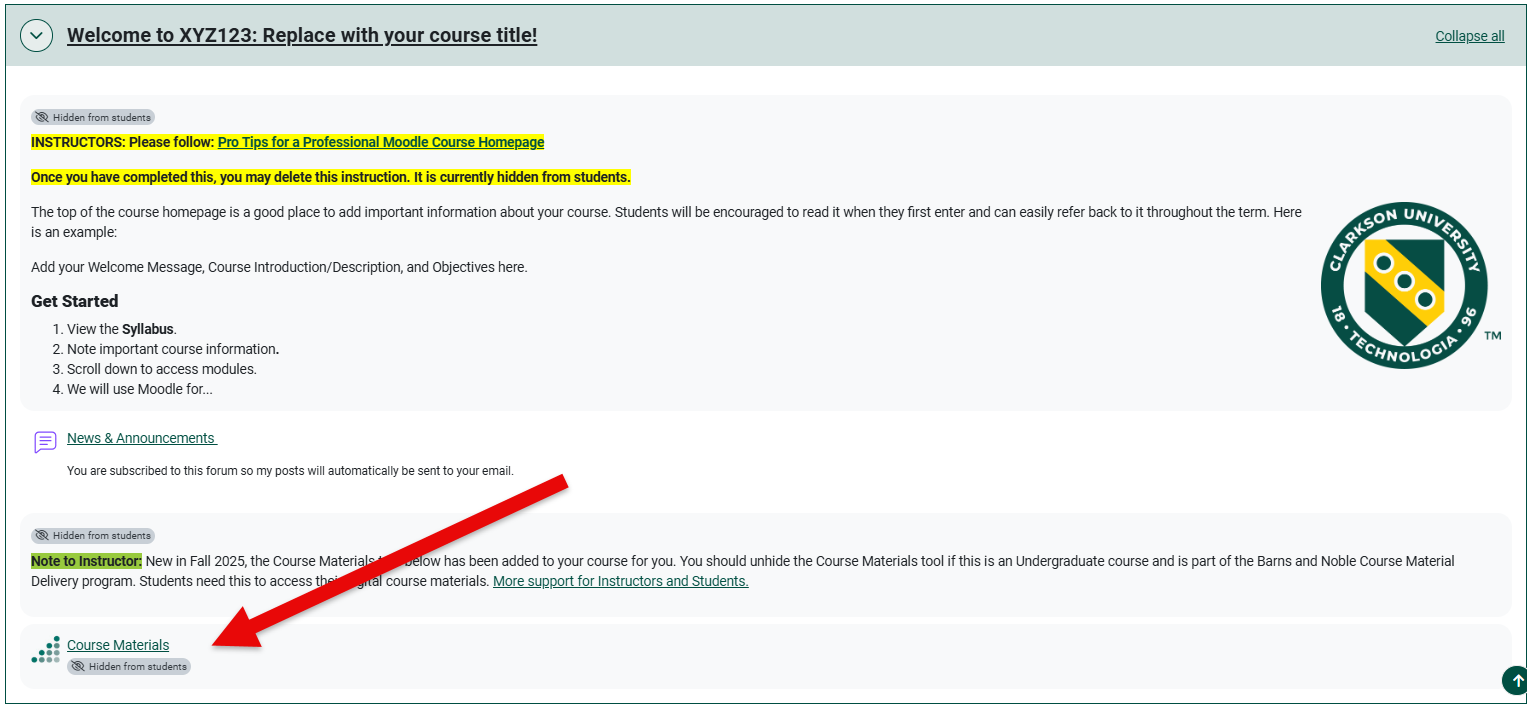
If the Course Materials tool has not already been added, please follow the instructions below for setup.
Steps

MessageSteps for Instructors:
Below are the steps needed to be taken by instructors to ensure digitally delivered materials are available for students in Moodle.
~4 Weeks Before Class Starts:Begins:
1) EnsureCheck that the Barnes & Noble College Course Materials link is installedadded soto studentsyour can access their digital course materials.course. If the Course Materials tool has not already been added to your course, please follow the instructions above for setup.
2) MakeUnhide sureand youclick have completedon the courseCourse setup/pairingMaterials forlink. This pairs your digital courseware products by clicking the Course Materials tool inwith your course. If you need assistance, please contact your publisher representative.
For courses using digital courseware materials only: Merged courses can cause student access issues. If you are merging your courses within Moodle, please let your bookstore manager know ASAP.
3) Please add the student instructions below to your syllabus and Moodle course.
Message for Students:
Student Instructions: This course is part of our course material delivery program, Clarkson Bound. The bookstore will provide each student with a convenient package containing all required physical materials and all digitally delivered materials for this course will be integrated into Moodle.
You should have received an email from the bookstore confirming materials provided for each of your courses and asking you to select how you would like to receive any printed components (in-store pick up or home delivery). If you have not done so already, please confirm your fulfillment preference so the bookstore can prepare your materials.
For more information about Clarkson Bound, please go to www.clarkson.edu/clarkson-bound.
Who Do I Contact with Questions?
For General Questions about Clarkson Bound:
- Call the Bookstore (315) 268-4300
- Email the Bookstore
- Visit the Bookstore website
- Contact Store Manager Evan Hitchman
Clarkson University Bookstore
Barnes & Noble #8366
Potsdam NY 13676
For Student Account Questions:
- Contact Clarkson's Student Achievement Services
For additional assistance please contact, Clarkson OIT Help Desk;
Online: Get Help
Email: helpdesk@clarkson.edu
Call: 315-268-HELP (x4357)