Faculty Toolkit for Moodle
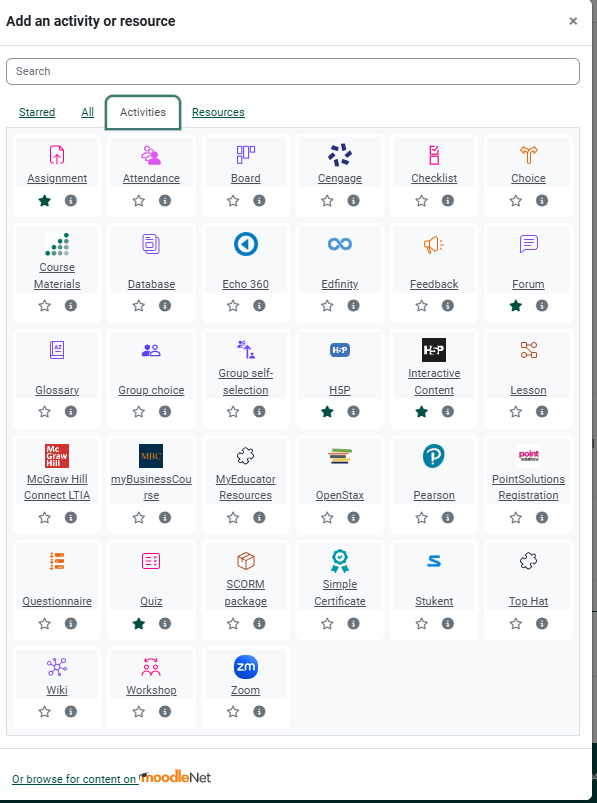
Moodle provides a wide variety of activities and resourcesactivities* for your classroom needs.
Download the Faculty Quick Reference: Moodle Activities & Engagement Benefits or view detailed information for using each activity in the table below.
| Activity | How it Engages Students | Example Use in a Course | How to Article |
| Forum | Promotes reflection, discussion, and peer learning. | In a Marketing course, students analyze a Super Bowl ad and discuss its effectiveness. | Forum |
| Board | Curating and sharing digital content, having discussions or debates, collaboration and creating class community. |
In a Business course, the instructor creates a board titled “Emerging Trends.”Students post articles, ads, or examples of current trends.Classmates “like” posts they find most relevant and add short comments or critique |
|
| Wiki | Fosters collaboration and shared knowledge-building. | In a History course, students co-create a timeline of major events. | |
| Database | Creates a class collection of resources. | In a Healthcare course, students upload case studies and comment on each other’s submissions. | |
| Glossary | Reinforces key terminology through student contribution. | In a Biology course, students define scientific terms with examples and images. | |
| Assignment | Provides a structured way to submit work and receive feedback. | In a Literature course, students upload essays for grading and comments. | |
| Quiz | Encourages practice and checks understanding with immediate feedback. | In a Math course, students complete weekly problem sets through multiple-choice and short-answer questions. | |
| Workshop | Develops critical thinking by peer reviewing each other’s work. | In a Writing course, students exchange drafts and provide structured peer feedback. | |
| Lesson | Guides students through adaptive, interactive content. | In a Business course, students complete a case study that branches into different scenarios based on choices. | |
| Choice | Collects quick feedback or decisions. | In a Communication course, students vote on which topic to debate in class. | |
| Survey | Provides insights using standardized survey tools. | In a Psychology course, students complete a survey on study habits. | |
| Feedback | Gathers custom student input and reflections. | In a STEM course, students submit mid-semester feedback on lab assignments. | |
| H5P | Adds engaging, interactive content. | In an Online Learning course, students complete an interactive branching scenario about time management. | |
| SCORM Package | Integrates multimedia learning modules. | In a Corporate Training course, employees complete a compliance SCORM module. | |
| Group Choice | Encourages autonomy by letting students pick groups. | In a Project-based course, students select their group for the final project. | |
| Book | Organizes learning material into chapters and sub-chapters. | In a Computer Science course, instructors provide a step-by-step coding guide. |
Forum
Forum: What It Is?
The Forum activity creates a space for asynchronous discussion. Students can post, reply, and share ideas, building engagement and critical thinking outside of class time.
Why Use It?
-
Encourages peer-to-peer learning and community building
-
Supports reflection and deeper thinking
-
Gives quieter students a voice
-
Extends class conversations beyond scheduled time
Practical Applications
-
Icebreaker: Ask students to introduce themselves and share one fun fact.
-
Debate: Post a controversial statement related to the topic and have students argue for or against.
-
Case Study Discussion: Provide a real-world scenario and prompt analysis.
-
Resource Sharing: Students post links or articles and discuss their relevance.
Tips for Faculty
✅ Set clear expectations for post length, tone, and deadlines.
✅ Model good participation by posting early and giving thoughtful replies.
✅ Use open-ended questions to spark deeper conversation.
✅ Encourage students to respond to peers, not just the instructor.
Variations
-
Q&A Forum: Students must post before they can see others’ responses.
-
Standard Forum for General Use: Good for ongoing discussions.
-
Single Simple Discussion: Best for focused, short-term conversations.
Board
Engaging students through visual collaboration
Moodle Board: What It Is
The Board activity is an interactive, visual “pinboard” where students post notes, links, or media.
Why Use It
-
Encourages curation of digital content.
-
Supports debate and discussion through comments/likes.
-
Builds community by making contributions visible.
Practical Applications
-
Students post examples of marketing trends or news articles.
-
Brainstorming ideas for group projects.
-
Sharing visual media, such as ad campaigns or infographics.
Tips for Faculty
✅ Set categories/columns to organize posts.
✅ Encourage short comments to deepen discussion.
✅ Use likes/votes to identify key resources.
Wiki
Database
Engaging students through collaborative collections
Moodle Database: What It Is
The Database activity lets students add entries (text, images, files) to a shared class resource.
Why Use It
Promotes collaboration and resource sharing.
Allows for structured contributions with templates.
Creates a class library of examples.
Practical Applications
Students submit case studies with solutions.
Image gallery of historical artifacts or lab samples.
Repository of useful websites for research.
Tips for Faculty
✅ Provide a clear template for submissions.
✅ Moderate entries if accuracy is critical.
✅ Allow peer rating for engagement.
Glossary
Assignment
Engaging students through submissions and feedback
Assignment: What It Is
The Assignment activity allows students to submit work (files or text) for grading and feedback.
Why Use It
-
Centralizes submissions in Moodle (no lost emails).
-
Provides space for private instructor feedback.
-
Supports multiple formats (documents, multimedia, online text).
-
Can integrate with the gradebook.
Practical Applications
-
Essay submissions with written or audio feedback.
-
Uploading spreadsheets for problem-solving assignments.
-
Recording video reflections and submitting as files.
Tips for Faculty
✅ Use clear instructions and rubrics.
✅ Enable Turnitin or plagiarism checking.
✅ Offer multiple attempts for drafts and revisions.
✅ Use the feedback comment area to guide improvement.
Quiz
Engaging students through practice and assessment
Quiz: What It Is
The Quiz activity delivers online assessments with auto-graded or manual questions.
Why Use It
-
Gives instant feedback to students.
-
Supports varied question types (MCQ, essay, drag-and-drop).
-
Can randomize questions for academic integrity.
-
Tracks performance data in the gradebook.
Practical Applications
-
Weekly low-stakes quizzes to reinforce readings.
-
Exam review with randomized practice questions.
-
Interactive self-checks with unlimited attempts.
Tips for Faculty
✅ Use question banks for variety.
✅ Allow multiple attempts for practice quizzes.
✅ Provide detailed feedback for wrong answers.
✅ Keep high-stakes exams timed and password-protected.
Workshop
WorkshopEngaging students through peer review
Workshop: What It Is
LessonThe Workshop activity supports peer assessment where students evaluate each other’s submissions using instructor-defined criteria.
Why Use It
ChoicePromotes critical evaluation and self-reflection.
SurveyBuilds assessment literacy by using rubrics.
FeedbackIncreases engagement through peer-to-peer interaction.
Practical Applications
Peer review of essays or research papers.
Students assess presentations with scoring guides.
Draft review before final project submission.
Tips for Faculty
✅ Provide clear rubrics and examples.
✅ Allow practice rounds with sample submissions.
✅ Monitor peer feedback for fairness and accuracy.
✅ Debrief with the class on lessons learned.
Lesson
Engaging students through interactive pathways
Lesson: What It Is
The Lesson activity presents content in a series of pages with branching options based on student choices or quiz responses.
Why Use It
Creates adaptive learning experiences.
Provides immediate feedback.
Supports self-paced exploration.
Combines content delivery with assessment.
Practical Applications
Interactive case study with decision points.
“Choose your path” simulations for problem-solving.
Step-by-step tutorials with knowledge checks.
Tips for Faculty
✅ Plan the flow with a storyboard before building.
✅ Use clear navigation options to avoid confusion.
✅ Keep branches short to maintain engagement.
✅ Add quizzes for formative assessment.
Choice
Engaging students through quick decision-making
Choice: What It Is
The Choice activity lets instructors pose a question and offer multiple answers for students to select.
Why Use It
Collects quick feedback.
Promotes engagement through polls.
Supports decision-making in class activities.
Practical Applications
Poll students on preferred project topics.
Check understanding with a quick knowledge question.
Vote on which case study to analyze.
Tips for Faculty
✅ Keep options clear and concise.
✅ Share results to spark discussion.
✅ Use for formative feedback, not high-stakes assessment.
Survey
Engaging students through standardized instruments
Survey: What It Is
The Survey activity uses pre-set, research-based questionnaires (e.g., COLLES, ATTLS) to collect data on student learning and attitudes.
Why Use It
Provides insights into learning styles and experiences.
Supports reflective teaching practice.
Allows comparison across courses using the same instruments.
Practical Applications
Gather student perceptions of online learning engagement.
Evaluate collaborative vs. individual learning preferences.
Use as a diagnostic tool at the start of the term.
Tips for Faculty
✅ Use for broad trends, not individualized feedback.
✅ Review data for patterns to adjust teaching strategies.
✅ Share key findings with students to build transparency.
Feedback
Engaging students through custom surveys
Feedback: What It Is
The Feedback activity allows instructors to create surveys with customizable questions to collect information from students.
Why Use It
Collects formative feedback to improve teaching.
Supports reflection and self-assessment.
Encourages student voice in shaping the course.
Practical Applications
Mid-semester check-in on workload or clarity.
Reflection surveys after group projects.
End-of-unit evaluation of learning effectiveness.
Tips for Faculty
✅ Keep surveys short to encourage completion.
✅ Use open-ended questions sparingly but effectively.
✅ Share a summary of results and your planned response.
✅ Encourage anonymous responses for honesty.
H5P
Engaging students through interactive multimedia
H5P: What It Is
The H5P activity lets instructors create and embed interactive content such as quizzes, flashcards, drag-and-drop activities, or branching scenarios.
Why Use It
Makes learning active and engaging.
Provides instant feedback.
Works seamlessly inside Moodle pages or lessons.
Practical Applications
Interactive video with embedded quiz questions.
Virtual flashcards for vocabulary or key concepts.
Branching scenarios for case-based learning.
Tips for Faculty
✅ Start with simple activities (e.g., multiple-choice, flashcards).
✅ Use H5P for formative, low-stakes engagement.
✅ Combine H5P with other Moodle tools for variety.
SCORM Package
Group Choice
Book
*Click on the Add and activity or resource link at the bottom of any section in Moodle to add an activity to your class.