
File Preparer Tasks
1. Upload Tenure File documents to File Preparer folders.
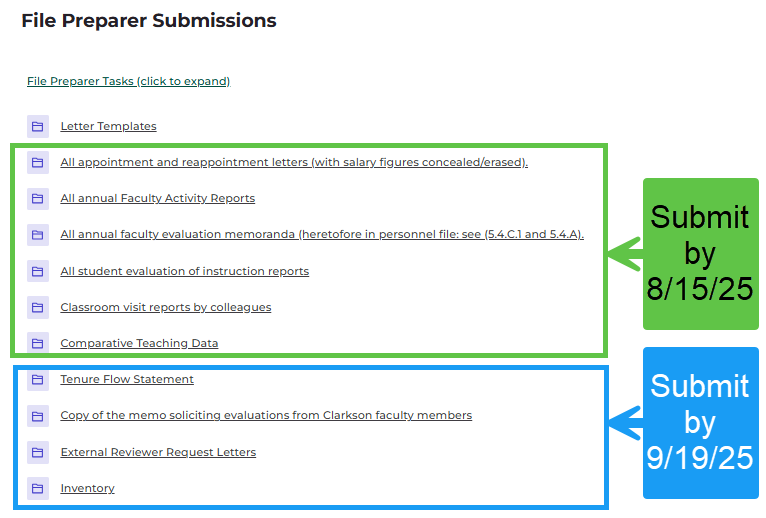
A) Upload these files BEFORE Clarkson Faculty Reviewers access Candidate's file and begin review:
- All appointment and reappointment letters (with salary figures concealed/erased).
- All annual Faculty Activity Reports
- All annual faculty evolution memoranda (heretofore in personnel file: see (5.4.c.1 and 5.4.A)
- All student evaluation of instruction reports
- Classroom visit reports by colleagues
- Comparative Teaching Data
***A NOTE about Comparative Teaching Data:
If the Candidate elects to share Evaluation of Instruction Reports to Clarkson Department Faculty reviewers, then Comparative Teaching Data is also made available to Clarkson Department Faculty reviewers.
B) Upload these files by File Preparer's deadline to load required documents and reviews (additional guidance in the folders):
- Tenure Flow Statement
- Copy of the memo soliciting evaluations from Clarkson faculty members
- External Reviewer Request Letters
- Inventory
- Reviews, see #2 Managing Reviewers below for detailed steps.
Exhibit A: Fall 2025 Submission Deadlines:
2. Managing Reviewers:
Complete all the following by File Preparer's deadline to load required documents and reviews:
A. Access Reviewer Checklist submitted by Candidate located in the Candidate Submissions section.
B. Select/download desired files for External Reviewers. Create .pdf for sharing to External Reviewers.
C. Select/download desired files for Testimonial Reviewers. Create .pdf for sharing to Testimonial Reviewers.
[Administrators will adjust file visibility for Clarkson Faculty reviewers as indicated on the checklist submitted by the Candidate]
D. Solicit reviews from External, Clarkson Faculty and Testimonial reviewers via email (check Letter Templates folder for samples):
-
- Candidate file must contain at least 6 External Reviewers (3 that are candidate’s choice and 3 preparer’s choice).
- External Reviewers are asked to provide a written evaluation of the candidate AND a CV or a brief statement sketching their professional background, including PhD institution, notable accomplishments and honors, and a link to their professional web page where possible. (OM 5.5.0.A11.9)
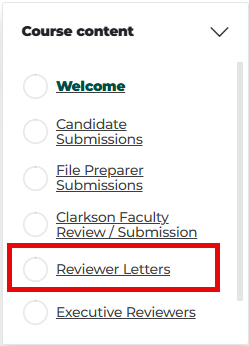
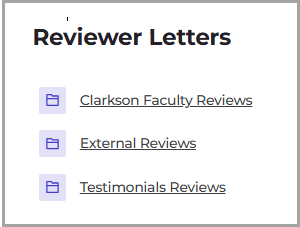
E. Once reviewers submit files, upload them to designated folders in Reviewer Letters section. From Course Content menu, select Reviewer Letters. Upload files to designated folders. See images below.
i. For Clarkson Faculty Reviewer Submissions:
-
-
- Download submissions from Clarkson Faculty Reviewer Submissions section
- Rename files to indicate Reviewer Name.
- In Reviewer Letters section, upload letters to Clarkson Faculty Reviews folder.
-
ii. For External Reviewers:
-
-
- File names: Name review files with the last name of the reviewer and append "_candidate choice" or "_file preparer choice". For External Reviewer CVs or professional bio statement, name the files with last name and append “_cv” to the name.
-
3. File Preparer/Chair writes a letter
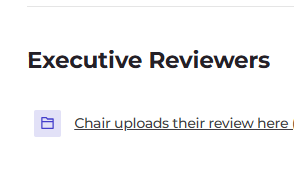
that evaluates the candidate's promotion file (in terms of the standards articulated in OM 5.3) and presents a recommendation regarding the candidate's suitability for promotion. File Preparer/Chair uploads their letter to the folder in the Executive Reviewers section.
Note:
After the File Preparer has submitted the Tenure File - only the File Preparer may add new material to the tenure file (apart from items listed in the OM 5.5.A.11.m-q of the tenure file). Consequently, if any person or group, including those reviewing the promotion file, develops new information that is to be considered during the tenure review, this information must be conveyed to the File Preparer for inclusion in the file. Likewise, if any reviewer contacts the author of a confidential deposition for clarification of the author's comments, an attempt must be made to secure this clarification in writing. If written comments cannot be obtained, then a written record of the conversation must be developed and sent to the File Preparer. In sum, any new information, documents, conversation accounts, or depositions considered during the tenure review must be forwarded to the File Preparer for inclusion in the file, the inventory updated, and the candidate so informed. The File Preparer may then develop a revised recommendation, if any, and forward it along with the new information through appropriate channels.
File is ready for Dean review.