
File Preparer Tasks
1) Upload final tenure file documents to be included in the file for review in the File Preparer folders. See below for updates to file submission deadlines.
***A NOTE about Comparative Teaching Data:
If the Candidate elects to share Evaluation of Instruction Reports to Clarkson Department Faculty reviewers, then Comparative Teaching Data is also made available to Clarkson Department Faculty reviewers.
Updates to Submission Deadlines:
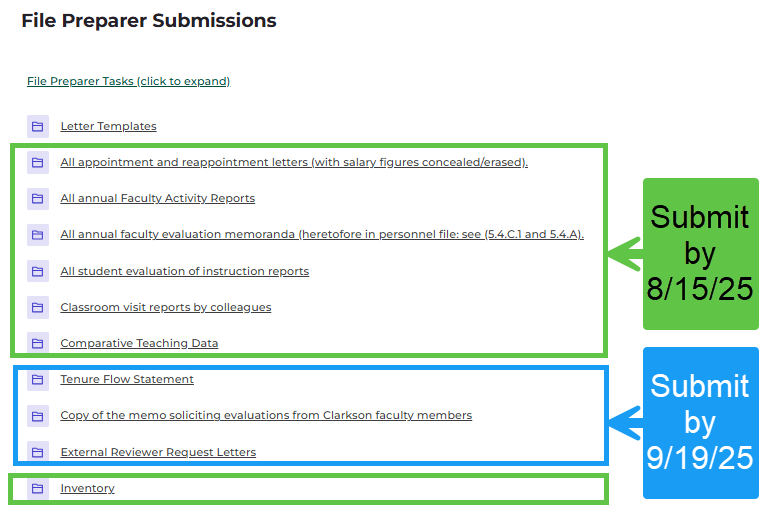
2) Managing Reviewers:
a) Access Reviewer Checklist submitted by Candidate located in the Candidate Submissions section.
b) Select/download desired files for External Reviewers. Create .pdf for sharing to External Reviewers.
c) Select/download desired files for Testimonial Reviewers. Create .pdf for sharing to Testimonial Reviewers.
[Administrators will adjust file visibility for Clarkson Faculty reviewers as indicated on the checklist submitted by the Candidate]
d) Solicit reviews from External, Clarkson Faculty and Testimonial reviewers via email (check Letter Templates folder for samples).
-
-
- External Reviewers are asked to provide a written evaluation of the candidate, and their CV or a brief statement sketching their professional background, including PhD institution, notable accomplishments and honors, and a link to their professional web page where possible. (OM 5.5.0.A11.9)
-
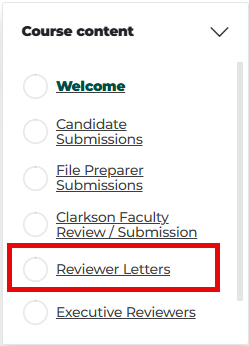
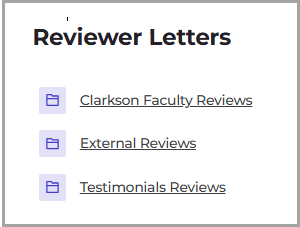
e) Once reviewers submit files, upload them to designated folders in Reviewer Letters section. From Course Content menu, select Reviewer Letters. Upload files to designated folders. See images below.
Naming files: Name files with the last name of the reviewer. For the external reviewers CVs or professional bio statement, name the files with last name and append “_cv” to the name.
3) Chair uploads their letter of review in the folder located in the Executive Reviewers section.
File is ready for Dean review.