
Requisition using Multiple Budgets
Follow the Add a Requisition instructions and return to these instructions before budget check and submit for approval
After entering the line item(s), click on the schedule icon of the first line you wish to split

From the Schedule page, click on the distribution icon

On the Distribution pop-up...
-
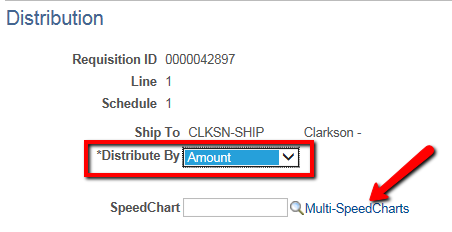
Change Distribute By to Amount
-
Select Multi-SpeedCharts
-
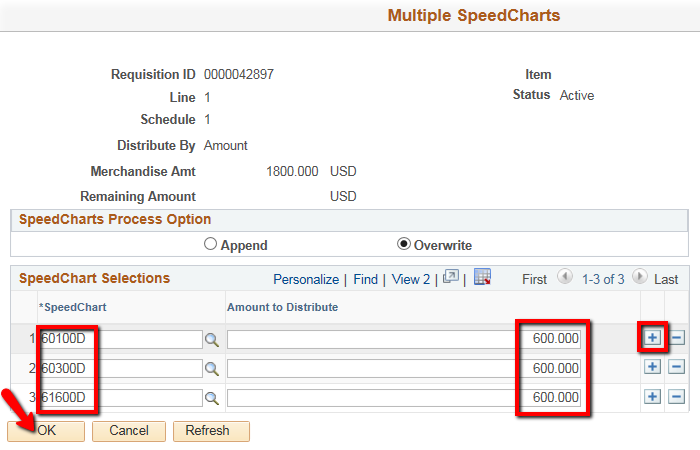
Click on the plus icon
 to add as many lines as you need (one for each budget)
 -
If you are entering more than 2 budgets, you will need to hit View All
 to see all the lines
 -
Enter the SpeedChart and the associated Amount to Distribute for each line
-
Click on OK

-
-
For information on SpeedChart selection, refer to Chartfield Values/SpeedCharts
-
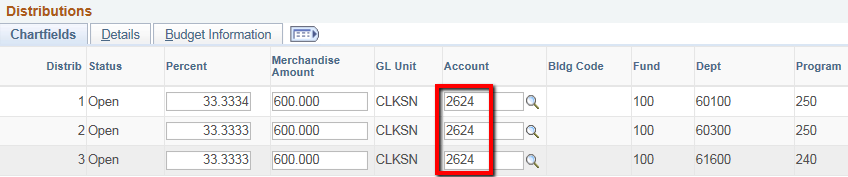
For information on Account selection, refer to Accounts
-
Click on OK

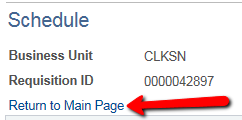
You are returned to the Schedule page, click on Return to Main Page

Return to Add a Requisition to Budget Check and Submit for Approval