
Overview: Navigate Moodle 4 at Clarkson
Overview: Navigate Moodle 4 at Clarkson
Summary
This Guide Will Help You to:
- Identify the
siteDashboard navigation menu options - Find your course
Seek further assistance
Identify the Dashboard navigation menu options
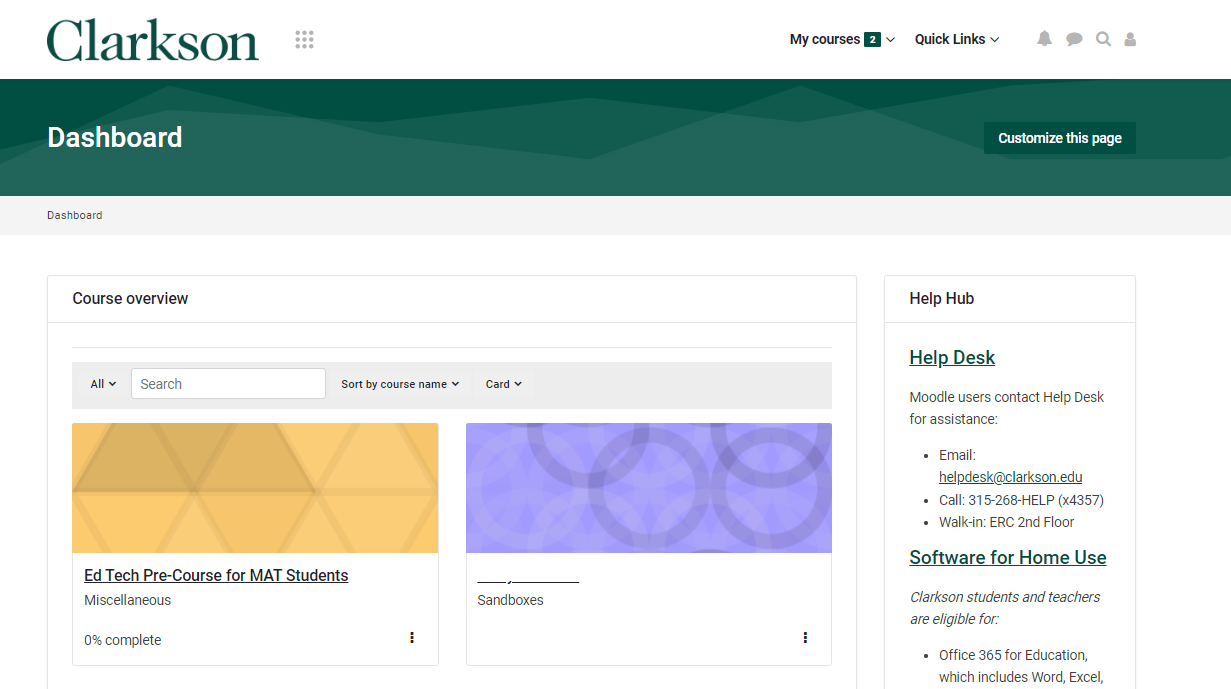
Dashboard - Takes you to our Moodle start page which gives you links to your enrolled courses including My Courses and Course Overview, along with Help Hub information, Quick Links and more. For more information, see Use the Dashboard page.
My courses - List of links to your courses that are currently in progress. For more information, see Access your courses form the My courses page.
Quick Links - Contains links to Help Desk, University Libraries, Academic Calendar, Learner Support resources, and SafetyNet (support for students of concern).
Find your course
Courses are made available to students by the first day of class. Students should contact their instructor with inquiries related to the course’s availability.
Using the SiteDashboard navigation menu
Select the My courses tab,tab usein the top navigation menu to locate courses currently in progress.
In Course Overview block, select the ALL drop down for the following options to filter your course.courses:
Select the desired course from the Course overview list.
For more information, see Customize and filter the My courses page.
Using thesearch
On the
glass icon in the top navigation menu.
In the Search box, type the name of the course Click enter
" "
Course IndexThe course index is a scrollable, collapsible drawer that displays course sections and elements. As you move up and down the central course area, your location is highlighted in the Course index. Clicking on an item in the Course index will open it up directly in the course central area.
" "
Seek Further Assistance
For additional assistance please contact, ITRCClarkson atOIT (208)Help 282 5880 or itrc@isu.eduDesk;
ThisEmail: workhelpdesk@clarkson.edu
Call: was315-268-HELP created by the Idaho State University Instructional Technology Resource Center and is licensed under a Creative Commons Attribution-NonCommercial 4.0 International License.(x4357)