
Moodle Maps
Summary
Gain familiarity with the parts of the Moodle Dashboard, Course and Quick Links using the following maps and keys.
This guide will help you to:
Map of Quick Links
Map of Moodle Dashboard:
![FireShot Capture 006 - Dashboard - Clarkson - [moodle.clarkson.edu].jpeg](https://bookstack.clarkson.edu/uploads/images/gallery/2025-06/nJ1sNQnApOiYG2TL-fireshot-capture-006-dashboard-clarkson-moodle-clarkson-edu.jpeg)
Key from Map of Moodle Dashboard:
Here on your dashboard you have access to a lot of things. Below is a breakdown of each important section with the corresponding number.
1) Notification Bell
The notification bar updates you on any assignments or notifications you may have. You can learn how to toggle your alerts and notifications settings here.
2) Profile
Your profile holds personal things such as your Profile, Grades, Calendar, Private Files, Reports, and Preferences.
Profile = View user details, course activity, and reports/grades
Grades = View grades from all courses
Calendar = View some, not all, assignment due dates
Private Files = Any files you have uploaded
Reports = Any reports made me you or instructors. You can view grades here also.
Preferences = You can edit your profile and preferences for your calendar, messages, notifications and more
3) Edit Mode
With edit mode, you can add new blocks to your dashboard to help you better navigate your content. You can edit your dashboard and your sidebar once this button is clicked.
4) Adding Blocks
You can add a variety of blocks that can help you focus on specific sections in Moodle. To learn how to add block visit
5) Sidebar
The sidebar on your homepage holds essential information from your school. You find Moodle resources, IT support, information on softwares for school use. You can also edit the sidebar when you click edit mode.
6) Dashboard
Your dashboard is home to all of your content. The main section is in the middle that holds the blocks you add or remove. To edit the blocks you must put your dashboard in edit mode in the top right corner. Vistit___to learn how to edit your dashboard.
ClassMap of Course 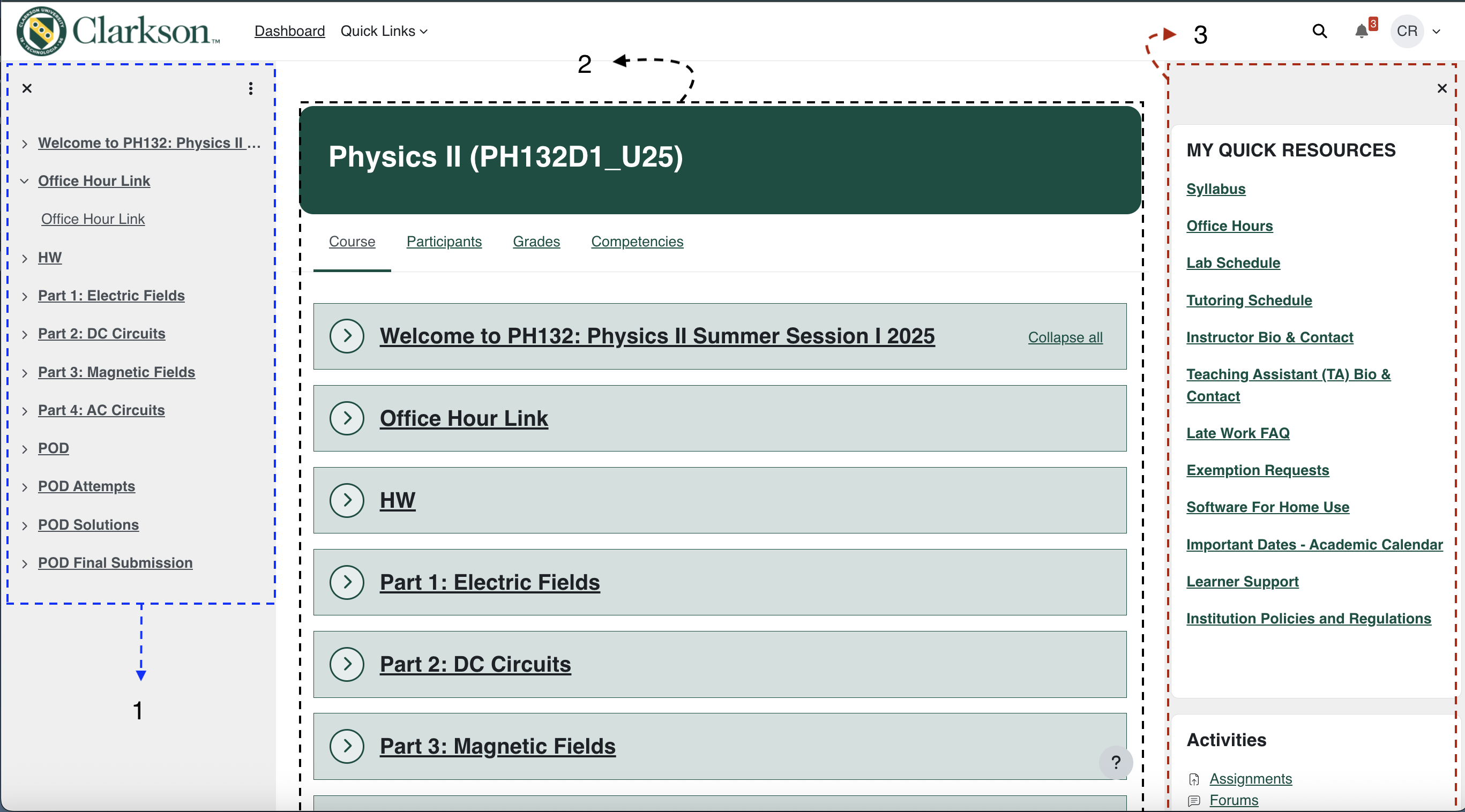
Key from Map of Course
Here on your dashboard you have access to a lot of things. Below is a breakdown of each important section with the corresponding number
1) Course Index
The course index is a summary of the course information located in the middle. You can view each module/chapter at a glance and click to expand each section.
2) Course Information
In the middle is the course details. Here you will find course information by unit, the class roster, and course grades. The course section will hold all of the information/materials you need to understand the material and complete assignments. The participants section holds the information of your peers in this course. You can also contact other students this way if needed. The grades section holds your grades for each assignment.
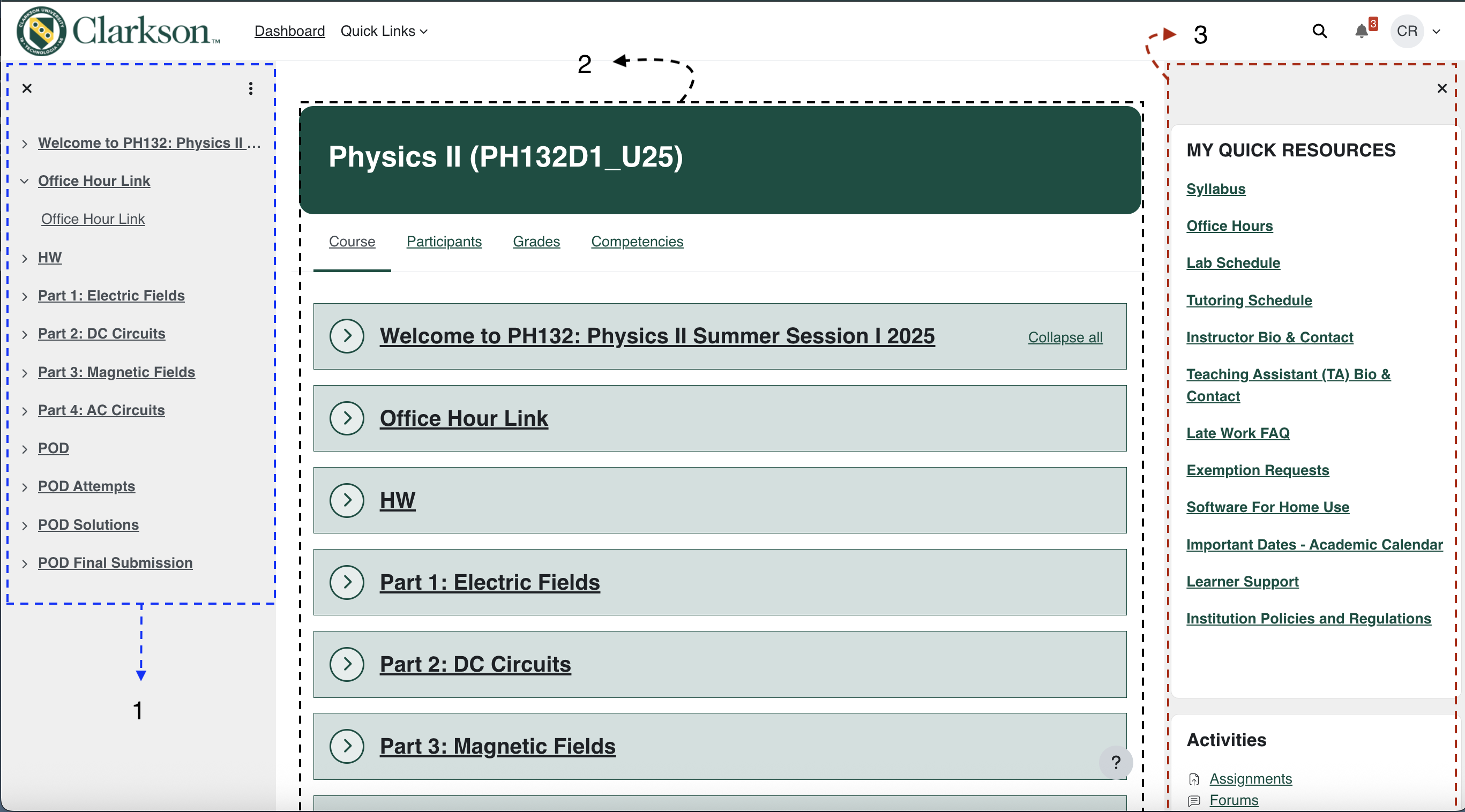
Map of Quick Links
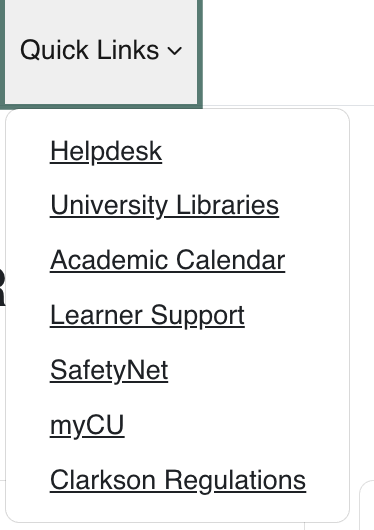
Here on your dashboard you have access to a lot of things. Below is a breakdown of each important section with the corresponding number
Quick Link Categories
Helpdesk: Support with Moodle, the DUO app, password help, and more
University Libraries: Find scholarly articles, books, and journals.
Academic Calendar: School year calendar
Learner Support: Receive technical and academic support (tutoring, clubs, health, counseling).
Safety Net: Submit a SafetyNet Form to quickly connect a student in need with a support team of faculty and staff
myCU: View your student profile and class information
Clarkson Regulations: University regulations and policies