
Forum Grading in Moodle: Whole forum vs Rating
Summary
In Moodle forums, youIn Moodle, instructors can grade studentforum participation usingin eithertwo main ways: Whole Forum Grading or Ratings. Whole Forum Grading allows instructors to assign a single grade for a student's entire forum activity (all posts and replies), whereas Ratings allow instructors to grade individual posts or replies within the forum. Each method works with Moodle’s Gradebook, but they serve slightly different instructional needs. This guide explains both options and helps you decide which approach fits your course goals.
This guide will help you to:
Choose between two options for grading forums in Moodle.
— assign one grade for a student’s overall contributions in a forum
Whole✅ Forum1. GradingRatings: Grade Individual Posts
SuitableWhen to use:
Use Ratings when you want to assessaward points or provide feedback on each individual post or reply a student makes in a forum. This method is useful if your rubric emphasizes quality or depth for multiple contributions.
How Ratings Work
Each student post and reply gets its own rating.
The ratings are automatically aggregated in the Gradebook based on your chosen method (e.g., sum, average, etc.).
Instructors can give detailed feedback while reviewing posts.
Students’ cumulative points are reflected in their Gradebook activity grade. (bookstack.clarkson.edu)
Setup (in Forum settings)
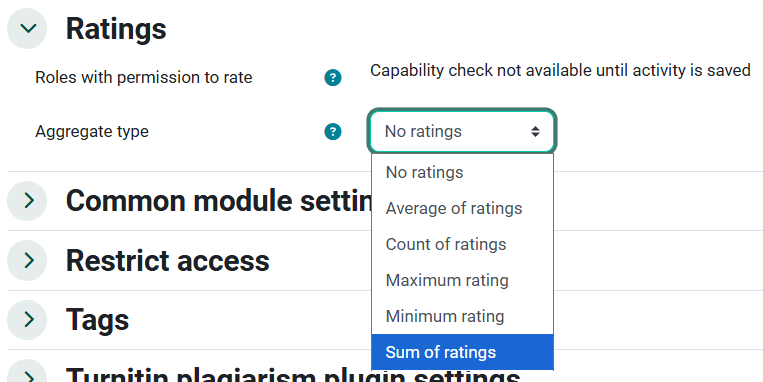
Expand the Ratings section in the forum settings.
Choose an Aggregate type (e.g., Sum of Ratings).
Set the Scale to Points (or another applicable grading scale).
Enter the Maximum grade to define the total points possible.
Save the settings.
Grading with Ratings
Navigate to each student’s posts and select a rating from the dropdown.
Continue for replies as well.
The Forum automatically totals each student’s points in the Gradebook.
Example: If you set the maximum to 100 and distribute ratings across posts, no student’s total will exceed 100 points.
Pros
Detailed, incremental feedback on separate contributions.
Grades accumulate continuously as discussions unfold.
Cons
Can be more time-intensive for forums with many posts.
✅ 2. Whole Forum Grading: One Grade for Overall Participation
When to use:
Choose Whole Forum Grading when you want to evaluate a student’s overall participation — looking at all posts and replies together — rather than grading individual contributions. This approach is similar to grading a single assignment that represents cumulative engagement.
Features
Provides a single grade per student for the entire forum.
Useful if your rubric emphasizes overall engagement, quality andof contributionthought, or breadth of a student's forum engagementparticipation rather than individual posts.actions.
Often easier when you prefer grading after the entire discussion period ends. (bookstack.clarkson.edu)
Setup (in Forum settings)
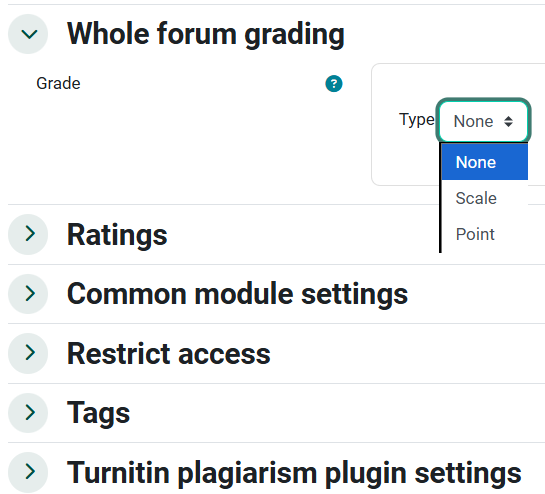
In the forum’s settings, find Whole forum grading and enable it.
Choose either Point or Scale as the grading type.
If using points, set the Maximum grade (e.g., 100).
 Save your settings.
Grading with Whole Forum
ProvidesaEnter
single,theoverallforumgradeafterfortheadiscussionstudent'speriodparticipationends.in a specific forum.InstructorscanClick
viewGrade users to open the grading interface.
You’ll see all of a student'student’s forum posts and replies on one pagetogether and thencan assign a single grade.grade based on your rubric.
Pros
Good for overall assessment of engagement and contribution quality.
Efficient when you want to grade once at the end of a discussion.
Cons
Less granular feedback on specific contributions compared with Ratings.
3. Comparison: Ratings vs Whole Forum
4. Tips for Choosing
Use Ratings if you want detailed scoring and feedback on each piece of student interaction.
Use Whole Forum Grading if your assessment centers on overall engagement or rubric-based synthesis.
Choose only one method per forum — using both will create duplicate gradebook entries.
5. Best Practices
Whatever method you choose, provide students with a discussion rubric that helps them to understand what is required for an exemplary forum participation including the minimum number of posts and criteria for posting. (A rubric can be easily integrated into the Grader )
Let dedicatedstudents "Gradeknow Users"how buttontheir forum will be graded (individual posts vs overall participation).
Use Private Reply in Ratings to accessoffer the grading interface.
Choose from Two Options to Grade Whole Forums
Ratings
Suitable for providing detailed feedback on individual contributions and when you want to track performance on specific posts.
Overall Grading Comparison
- Whole forum grading assesses the overall contribution, while ratings assess individual posts/replies.
- Ratings typically offer more detailed feedback options compared to whole forum grading.
- Both methods integrate with the Moodle gradebook,
- Ratings are automatically entered into the gradebook as they the posts are rated in the forum allowing the instructor to read and rate posts at anytime during the discussion.
- whereas Whole Forum posts must be graded after students have made all of their required posts, typically this means waiting until after the end date for the forum to grade.
- Whole forum grading provides a consolidated view of a student's participation, while ratings are applied to individual posts/replies.
Tips
- Choose one or the other type of grading for each forum, as using both methods in one forum will create duplicate entries in the gradebook.
- The best choice depends on your grading style and what you want to emphasize (overall contribution or individual posts).
Whatever method you choose, provide students with adiscussion rubricthat helps them to understand what is required for an exemplary forum participation including the minimum number of posts and criteria for posting.
Seek Further Assistance
For additional assistance please contact, Clarkson OIT Help Desk;
Email: helpdesk@clarkson.edu
Call: 315-268-HELP (x4357)