
Welcome to the Instructor Guidebook
This Instructor Guidebook: Teaching & Learning at Clarkson University was created by the Teaching & Learning Corner (TLC) team to help Clarkson instructors successfully design, teach, manage, and improve their courses. The guidebook includes practical resources, teaching strategies, technology support, Moodle help, policies, and frequently asked questions. Whether you teach fully online, hybrid, synchronous, or in-person courses, this guidebook is designed to support you throughout the semester.
What You Will Find in the Guidebook
Course delivery modes and syllabus preparation
Getting started with Moodle
Course design and quality standards
Communication and student engagement
Online teaching best practices
Educational technology tools and support
Assessment, grading, and feedback
Policies, procedures, and accessibility resources
Frequently asked questions
Sample templates, rubrics, and teaching resources
The guidebook also contains appendices with practical materials instructors can adapt for their own courses.
Chapter:
Topics:
1. What is Teaching & Learning 2. Preparing Your Course for StudentsCourse design and quality standards
3. Communication and Student Engagement
7 C's of Effective Communication
4. Effective Online Teaching Practices10 Effective Practices Checklist
Accessibility & Universal Design for Learning
Regular and Substantive Interaction (RSI)
5. Technology Tools and SupportEdTech Toolkit: Basic Tech Tools
6. Assessment and GradingAssessment, grading and feedback
7. Policies and ProceduresPolicies, procedures, and accessibility resources
8. Frequently Asked Questions AppendicesSample templates, rubrics and teaching resources
How to Navigate the Guidebook
Use the Left Navigation Menu
-
Click a chapter title to expand it
-
Select any page to open its content
-
Use the arrows beside chapter names to collapse or expand sections
This makes it easy to move between topics without losing your place.
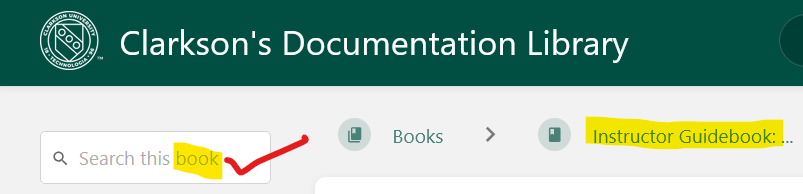
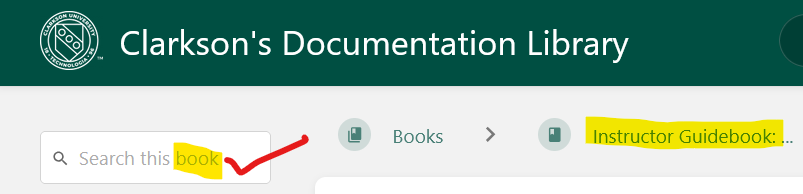
Use the Search Feature
At the top left of the Instructor Guidebook window, use the search bar to quickly locate topics in the guide such as:
- Moodle tools
-
Zoom
-
Gradebook
-
Attendance
-
Accessibility
-
Quality Matters
-
AI tools
-
Rubrics
-
Assessments
Follow the Chapter Sequence
New instructors may benefit from reading the guidebook in order:
-
Start with Chapter 1: What is Teaching & Learning
-
Move to Preparing Your Course for Students
-
Explore communication, engagement, and technology tools
-
Review assessment and grading practices
-
Bookmark the FAQ and Appendix sections for future reference
Experienced instructors may prefer to use the guidebook as a searchable reference tool instead.
Recommended Ways to Use the Guidebook
Before the Semester Begins
Use the guidebook to:
-
Build or revise your syllabus
-
Prepare your Moodle course
-
Review course quality recommendations
-
Set up communication plans
-
Explore technology tools available at Clarkson
During the Semester
Use the guidebook to:
-
Find answers to Moodle questions
-
Review grading and assessment practices
-
Locate communication templates
-
Explore engagement ideas and discussion activities
-
Access support resources for students
When You Need Help
Many pages include links to additional Clarkson resources, tutorials, and support materials.
If you cannot find what you need:
-
Contact the Teaching & Learning Corner
-
Reach out to your instructional designer
-
Submit a Moodle support request
-
Explore linked technology tool documentation
Tips for Getting the Most from the Guidebook
-
Bookmark frequently used pages
-
Use the search feature often
-
Review the FAQ chapter before submitting support requests
-
Revisit the appendices for templates and examples
-
Check back regularly for updated content and new resources
The guidebook is continuously updated to reflect current Clarkson teaching practices, Moodle updates, and emerging instructional technologies.
Quick Access
-Open the Instructor Guidebook
-Browse Clarkson Documentation Library
-Search BookStack Documentation