
Installing EMS Client
Step-by-step guide
- Contact RoomReservations@Clarkson.edu first to make sure the client is actually the best tool for you!
- Go to https://reserve.clarkson.edu/EMSDesktopWebDeploy
- Follow the instruction on the page to install the EMS Client
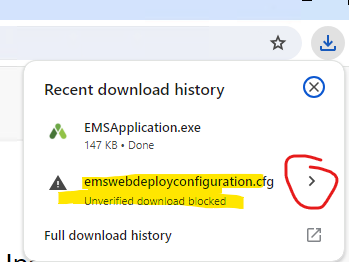
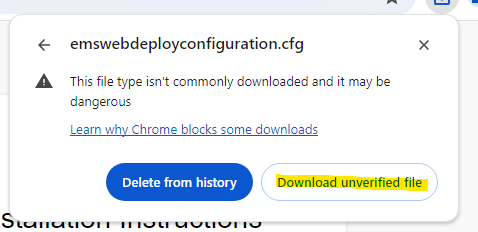
- NOTE: Be sure to check your downloads to verify that the emswebdeployconfiguration.cfg file was downloaded, the installation will fail without this. The file needs to be named exactly as it is stated above, remove any instances where it contains (1), (2), etc.
Refer to the EMS Client Support for instructions on using the client to manage your spaces.